Open Cascade to DXF Translator
Leverage the LibreCAD DXF library to convert Open Cascade 3D geometry into industry-standard DXF files
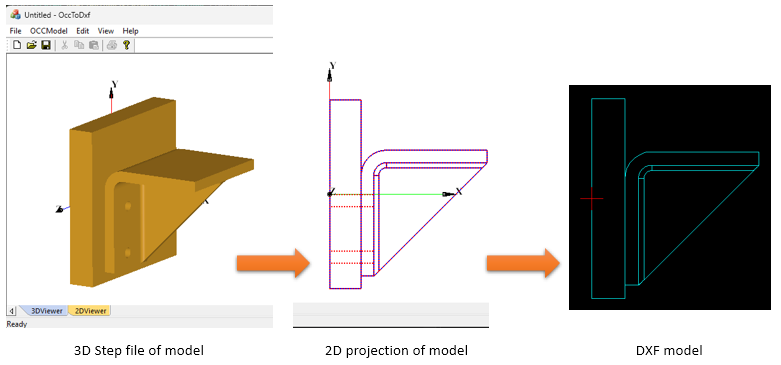
Leverage the LibreCAD DXF library to convert Open Cascade 3D geometry into industry-standard DXF files
.
Open CASCADE Technology (OCCT) is the only open-source full-scale 3D geometry library widely used for 3D modeling (CAD).
DXF (Drawing Exchange Format) is a widely used format for representing CAD data. Open Cascade, an open-source CAD library, provides robust tools for handling 3D geometry and exporting it to various formats.
Many CAD applications require interoperability with DXF files. While Open Cascade provides export capabilities for standard formats like STEP and IGES, direct DXF export is not built-in. This project aims to fill that gap by implementing a custom DXF writer known as OccDxfConv.
.
HLRBRep_Algo and HLRBRep_PolyAlgo are two algorithms provided in Open Cascade to compute projections of a 3D model. These algorithms operate on a shape and remove or indicate edges hidden by faces. For a given projection, they calculate a set of lines characteristic of the object being represented. They are also used in conjunction with extraction utilities, which reconstruct a new, simplified shape from a selection of the results of the calculation. This new shape is made up of edges, which represent the shape visualized in the projection.
To pass a TopoDS_Shape to an HLRBRep_Algo object, use
HLRBRep_Algo::Add. With an HLRBRep_PolyAlgo object, use
HLRBRep_PolyAlgo::Load. If you wish to add several shapes, use Add or Load.
HLRBRep_Algo::Projector and HLRBRep_PolyAlgo::Projector set a projector
object which defines the parameters of the view. This object is an HLRAlgo_Projector.
HLRBRep_PolyAlgo::Update launches the calculation of outlines of the shape visualized by
the HLRBRep_PolyAlgo framework.
In the case of HLRBRep_Algo, use HLRBRep_Algo::Update. With this algorithm,
you must also call the method HLRBRep_Algo::Hide to calculate visible and hidden lines
of the shape to be visualized. With an HLRBRep_PolyAlgo object, visible and hidden
lines are computed by HLRBRep_PolyHLRToShape.
The classes HLRBRep_HLRToShape and HLRBRep_PolyHLRToShape present a range
of extraction filters for an HLRBRep_Algo object and an HLRBRep_PolyAlgo
object, respectively. They highlight the type of edge from the results calculated by the algorithm
on a shape. With both extraction classes, you can highlight the following types of output:
visible/hidden sharp edges;
visible/hidden smooth edges;
visible/hidden sewn edges;
visible/hidden outline edges.
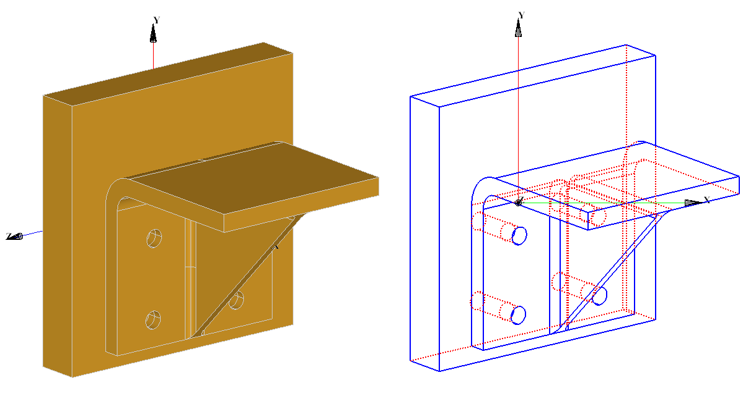
DXF files follow a structured format with sections such as HEADER, TABLES, BLOCKS, and ENTITIES. The translator focuses on the ENTITIES section, where geometry is written in DXF syntax.
The approach includes:
Writing the DXF file using Libre Cad DXF library.
Defining layers and line types (if needed)
Converting extracted Open Cascade geometry into DXF entity definitions.
Ensuring correct formatting for DXF compatibility
The translator extracts geometric entities from the Open Cascade model.
The key steps include:
Iterating through shapes in the TopoDS_Shape data structure.
Projecting the 3D model on a view plane to create 2D projection model.
Identifying supported entities in the 2D model (lines, circles, arcs, polylines, and faces).
Translating the extracted OCC geometric entities in to DXF entities.
Setting Up the Open Cascade Environment (v 7.5)
To develop the translator, the following tools and dependencies were used:
Open Cascade (OCCT) for handling CAD geometry.
C++17 for efficient and modern development.
The DXF library from Libre CAD, an open-source CAD application, for handling DXF structure and format.
A simple 3D/2D viewer developed in VC++.
COCCViewerView class is derived from CView and AIS_ViewController to
display 3D models.
External 3D models are imported using the STEP translator available in Open Cascade.
OCC2DView class is derived from COCCViewerView to display 2D shapes extracted using
projection algorithms.
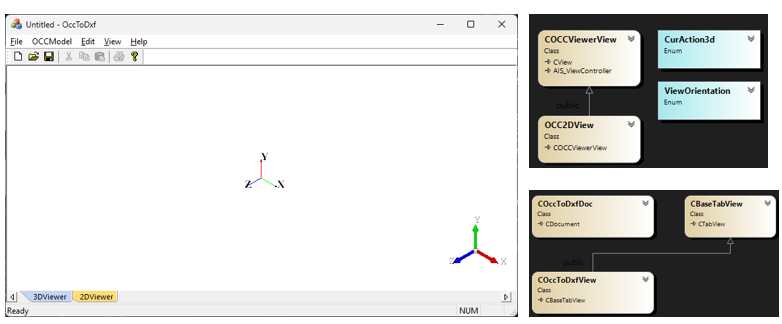
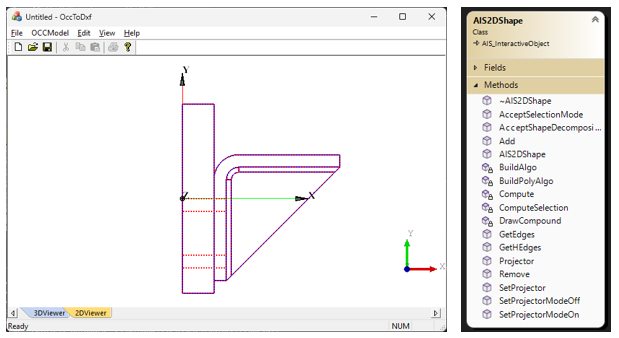
Imported 3D models are converted to 2D views using projection algorithms and displayed in the viewer using a
special class AIS2DShape derived from AIS_InteractiveObject class, which takes the 3D
model and computes the 2D
projection of the model based on the orientation of the model.
COccDxfConv class is the main work horse where the open cascade entities are converted in to DXF
entities.
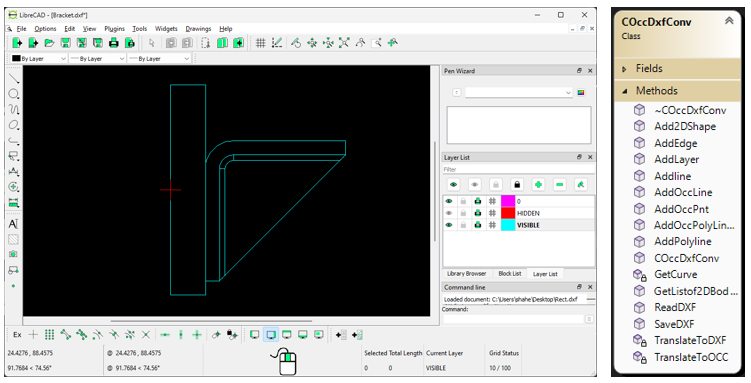
OccDxfConv translator is also capable of reading points, lines and polylines and create geometry in open cascade
which can be converted to TopoDS_Shape for visualization.
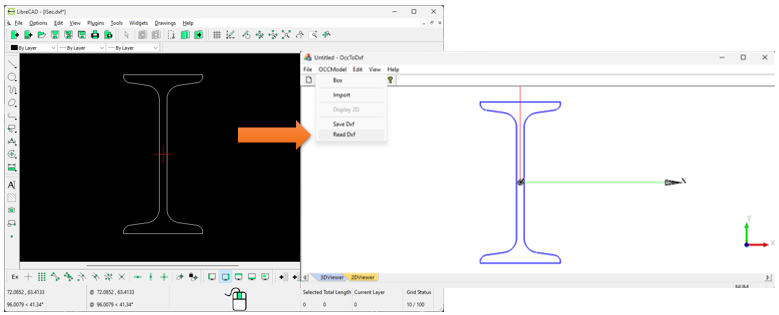
This OccDxfConv DXF translator provides a direct DXF export feature. The implementation allows for seamless CAD data exchange, making it useful for various engineering applications.
By developing this translator, we bridge the gap between Open Cascade and DXF-based workflows, enabling better CAD interoperability in C++ applications.

All rights reserved